Megaport NAT Gateway Route Advertisement
This topic describes NAT Gateway peering types and the routes advertised by each peering type.
The Megaport NAT Gateway (NAT Gateway) works in multicloudThe use of multiple cloud computing services in a single heterogeneous architecture. For example, an enterprise might use multiple cloud providers for infrastructure (IaaS) and software (SaaS) services. One of Megaport’s core value propositions is enabling multicloud connectivity.
architectures that are connected using different combinations of peering types. In addition to private peering connectivity, NAT Gateway can connect to public peering types such as AWS, Azure, Oracle, and other Cloud Service Providers (CSPs).
NAT Gateway uses a Virtual Cross Connect (VXC) to connect to other endpoints on the Megaport network. The VXCs support different types of peers. NAT Gateway employs routing policies aligned with the VXC peering type.
The peering type defined for the VXC determines which routes are advertised.
NAT Gateway peering types
NAT Gateway supports the peering types shown in this table:
| Peering Type | Megaport Peering Attribute | Routes Advertised |
|---|---|---|
| Non-cloud | NON_CLOUD | Routes from the Border Gateway Protocol (BGP) peer behind a Port and AWS Hosted Connections. |
| Private cloud | PRIV_CLOUD | Routes from AWS Hosted VIF Private, Azure Private Peer, and Google Cloud Platform. |
| Public cloud | PUB_CLOUD | Routes from AWS Hosted VIF Public, Azure MS Peer, Salesforce, and other cloud providers. |
Note
- Although you can configure private cloud and public cloud peering types simultaneously, NAT Gateway does not exchange routes between the two.
- AWS Direct Connect Hosted Connection partners cannot see the VIF type created within AWS. As a result, traffic from these hosted connections is categorized as NON_CLOUD. NAT Gateway users should take care not to advertise public cloud routes to other cloud providers. NAT Gateway route filtering is available to help manage this.
Non-cloud VXCs
NON_CLOUD VXCs are categorized into these types:
- Physical Port Connections – VXCs connected to a physical port in a data center, typically referring to private network infrastructure.
- AWS Hosted Connections – These are classified as NON_CLOUD because AWS connectivity partners do not have a mechanism to identify the VIF type created within AWS.
- Megaport Marketplace Service Providers – Connections to various service providers listed in the Megaport Marketplace.
- Business-to-Business (B2B) VXCs – Connections established between multiple Megaport accounts using service keys.
For more information, see Setting up Service Keys.
| Megaport Endpoint | Peering Type |
|---|---|
| Physical Port | Private VXC |
| NAT Gateway | AWS Hosted Connection on VXC |
| Megaport Marketplace | Private VXC |
| B2B VXC | Service Key |
Private cloud VXCs
Private cloud (PRIV_CLOUD) VXCs connect to private peering options with public Cloud Service Providers (CSPs). Private peering typically involves exchanging RFC 1918 routes with the service provider.
| Cloud Service Provider | Peering Type |
|---|---|
| AWS Direct Connect | Hosted VIF with Private VIF |
| Azure ExpressRoute | Private Peering |
| Google Cloud Interconnect | Partner Interconnect Attachment |
| Oracle Cloud Infrastructure | FastConnect Private Peering |
Similar connectivity is available from IBM Cloud, Alibaba, SAP HANA Enterprise Cloud, and many other CSPs.
Public cloud VXCs
Public cloud (PUB_CLOUD) VXCs provide direct connectivity to public peering options from public CSPs. Public peering options typically involve exchanging public address space with a service provider.
| Cloud Service Provider | Peering Type |
|---|---|
| AWS Direct Connect | Hosted VIF with Public VIF |
| Azure ExpressRoute | Microsoft Peering |
| Salesforce | ExpressConnect |
| Oracle Cloud Infrastructure | FastConnect Public Peering |
Route advertisement scenarios
Non-cloud and private cloud
A combination of non-cloud and private cloud connectivity is fairly straightforward when it comes to route advertisement. Using network virtualization and segmentation mechanisms allow multi-tenant networks to exchange private RFC 1918 address space between each environment. The private cloud is introduced as a private node on your internal network.
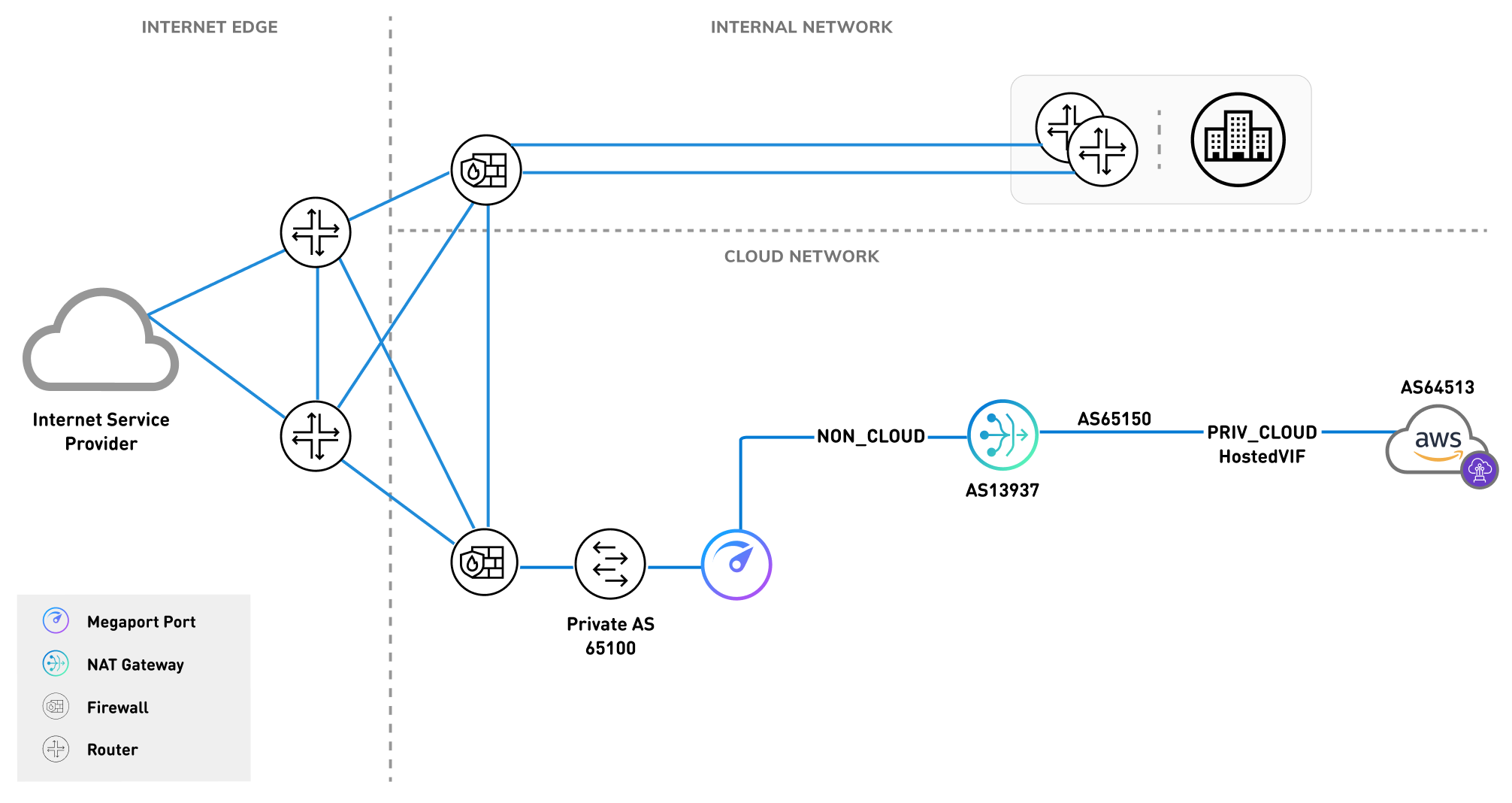
This image shows a corporation using a firewall to segment its cloud connectivity. The cloud network is connecting from their firewall in the data center to their NAT Gateway via a private NON_CLOUD VXC. The NAT Gateway is, in turn, connecting to AWS via a PRIV_CLOUD VXC.
Public cloud
The public cloud connectivity option requires the exchange of public address space, similar to peering with an internet service provider (ISP). Large organizations that require connectivity to multiple ISPs employ network engineers and architects that are familiar with all of the nuanced requirements necessary to participate in exchanging public routes on the internet.
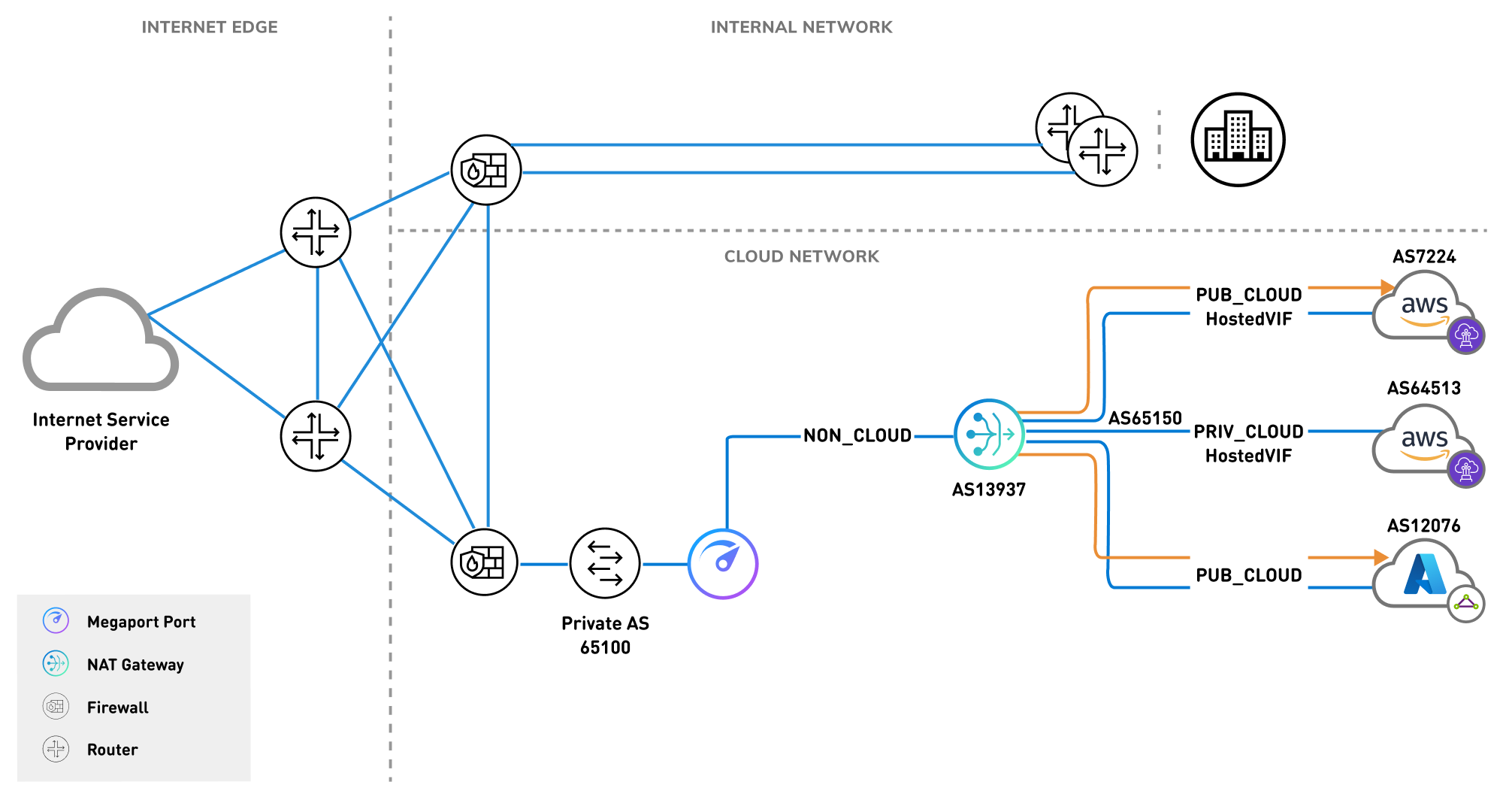
NAT Gateway alleviates some of these nuances by providing default policies that ensure you don’t inadvertently advertise public routes of one CSP to another CSP. For example, consider route advertisement in a network topology with an ExpressRoute Microsoft peering to Azure and a public virtual interface (VIF) to AWS.
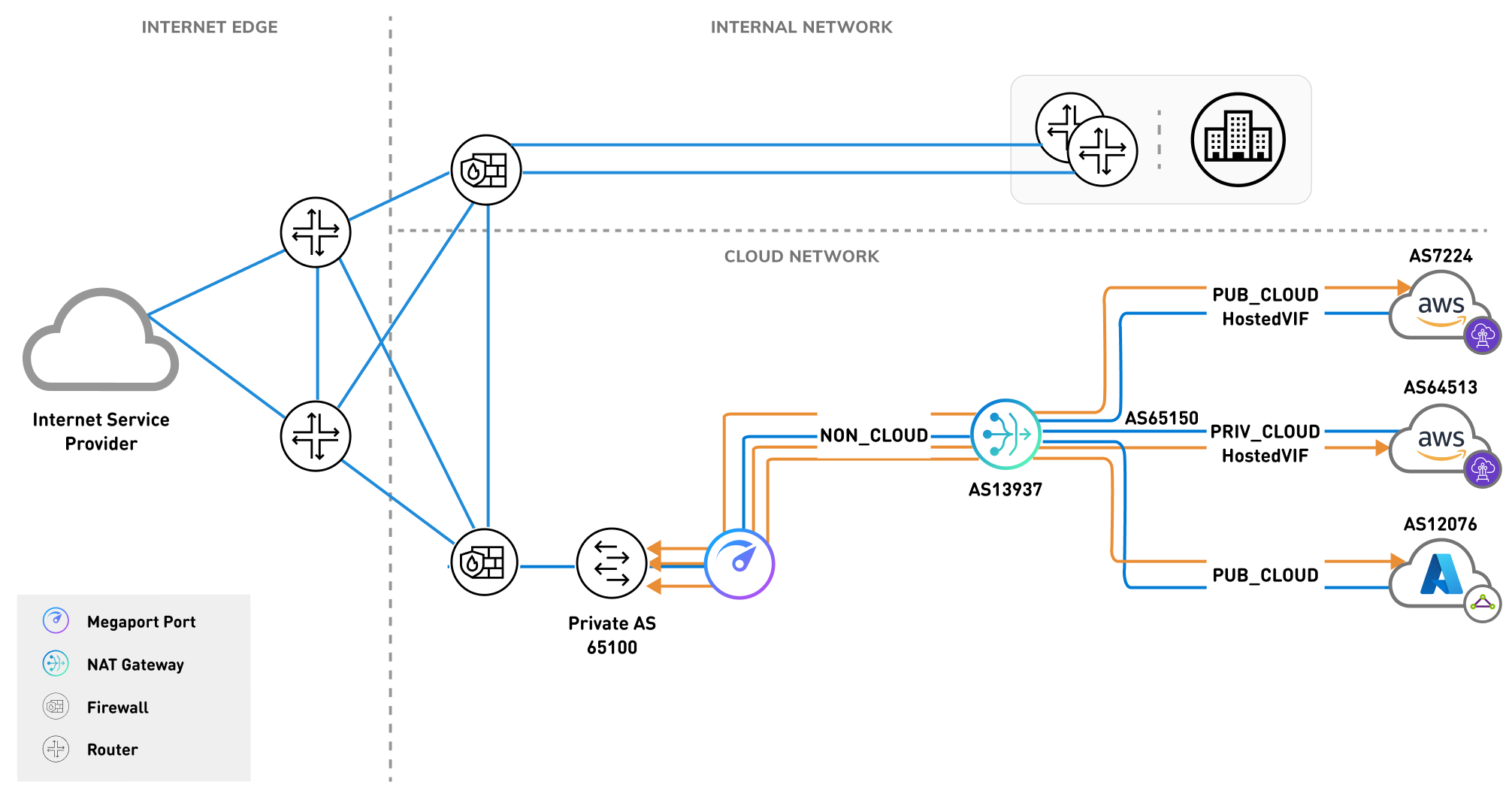
If any-to-any connectivity were allowed between the two public cloud peerings, all traffic between AWS and Azure would traverse NAT Gateway. This would cause a global service disruption for both CSPs. To avoid service disruption, the CSPs protect their customers with policies that prevent this type of misconfiguration. However, because mistakes can happen, NAT Gateway also has routing mechanisms in place to restrict the public cloud peering types from exchanging public address spaces.
NAT Gateway route advertisement configurations
The supported NAT Gateway route advertisement configuration types are:
- Public cloud → Non-cloud
- Private cloud → Non-cloud, Private cloud
- Non-cloud → Non-cloud, Private cloud, Public cloud
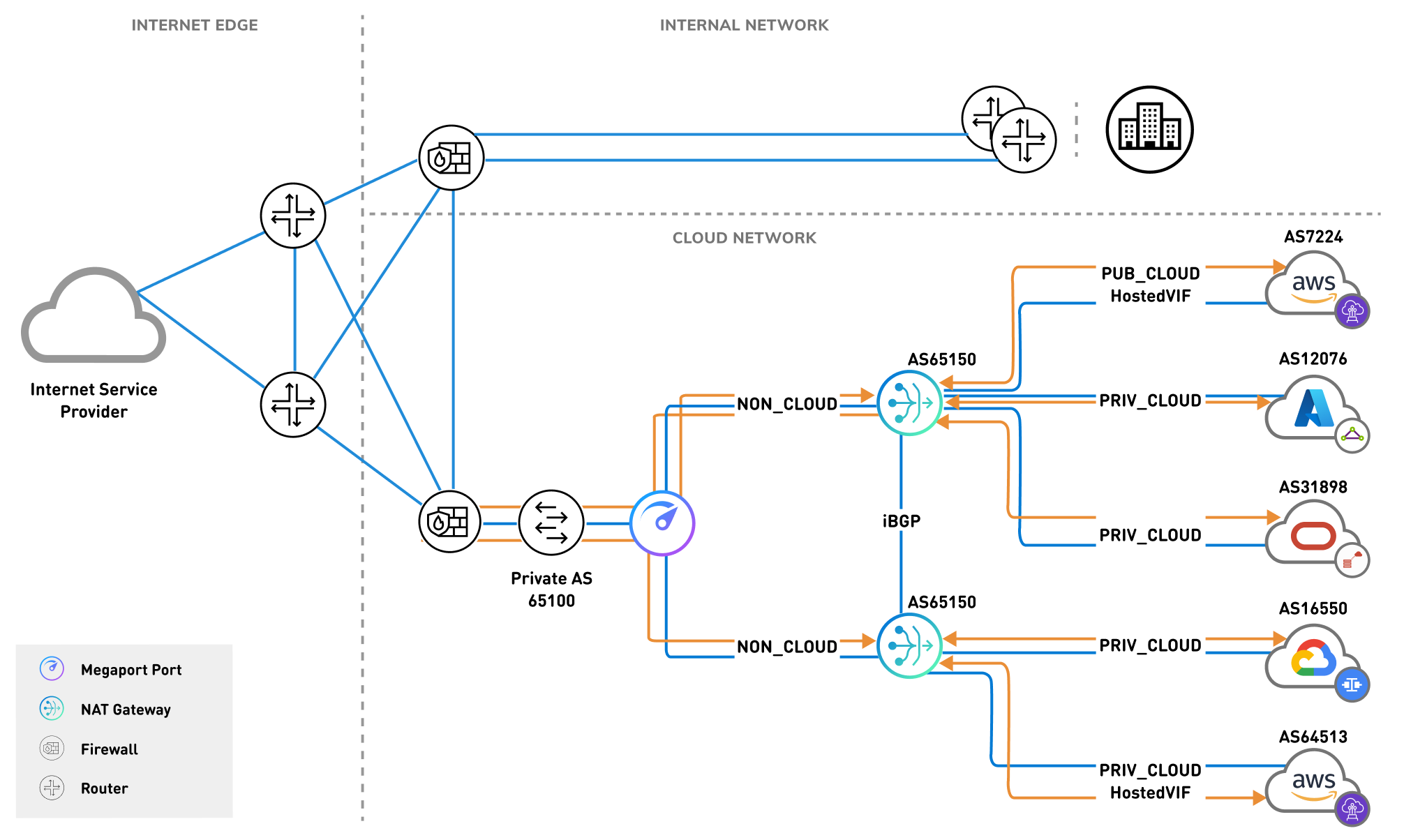
Support for these peering configuration types enables a globally available platform that allows rapid, on-demand deployment of routing services in a secure manner, with best practice routing policies already applied.