Megaport NAT Gateway BGP Peer Filtering
This topic describes Megaport NAT Gateway (NAT Gateway) BGP peer filtering, which provides simple connection-level control over route exchange between BGP neighbors.
For an overview of route filtering concepts, see Megaport NAT Gateway Route Filtering.
Before you begin
Before configuring a route filter, plan the implementation by determining your requirements. Then create a route filter based on these requirements.
Deployment considerations
- You need to create a NAT Gateway, as described in Creating a NAT Gateway.
- You can configure route filters before or after configuring BGP, as route filters work on existing or new BGP connections.
- You might want to shut down BGP route exchange if you plan to add several BGP sessions across your Virtual Cross Connects (VXCs) before they exchange route information and route filters are applied. When you are finished configuring, you can then go into the relevant BGP sessions and enable them. For more information, see Configuring a NAT Gateway VXC.
Important
NAT Gateway route filtering supports and relies on the BGP Route Refresh mechanism to update routes using a soft reset when filters change the routing. If Route Refresh is not enabled on all active BGP connections, you need to shut down and re-enable the connection in the Megaport Portal to update routes. If you have enabled the BGP Shut Down option, routes will be updated when you disable BGP Shut Down, that is, re-enable BGP.
Filtering by BGP peer
By default, NAT Gateway permits all routes unless otherwise filtered by the peer type policy. For more information, see Default peering route advertisements.
You can configure a policy for each pair of BGP connections configured on the NAT Gateway to fine-tune routing. The BGP pairings are unidirectional, meaning that each pair of BGP connections has two policies - one for A to B, and another for B to A.
A BGP peer filter policy has three possible actions:
- Default – Follows the default policy defined by the source peering type BGP connection.
- Permit – Allows routes received from neighbor A to be advertised to neighbor B.
- Deny – Prevents routes received from neighbor A from being advertised to neighbor B.
BGP peer filter example
BGP connections A, B, and C are connected to the same NAT Gateway.
Connection A has a global permit policy. To filter routes toward connection B, the A to B policy can be set to Deny without affecting any routes advertised to C.
Connection C has a global deny policy. To allow routes to be advertised only to A, the C to A policy can be set to Permit. If a new BGP peer is added later, routes from C will follow the global policy and not be advertised.
Creating a BGP peer filter
A BGP peer filter limits the number of routes that are advertised or received from BGP neighbors.
To create a BGP peer filter
- Select the VXC attached to the NAT Gateway, then select A-End.
-
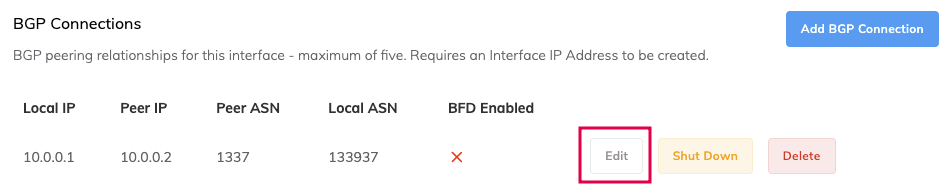
Next to the BGP connection, click Edit.
-
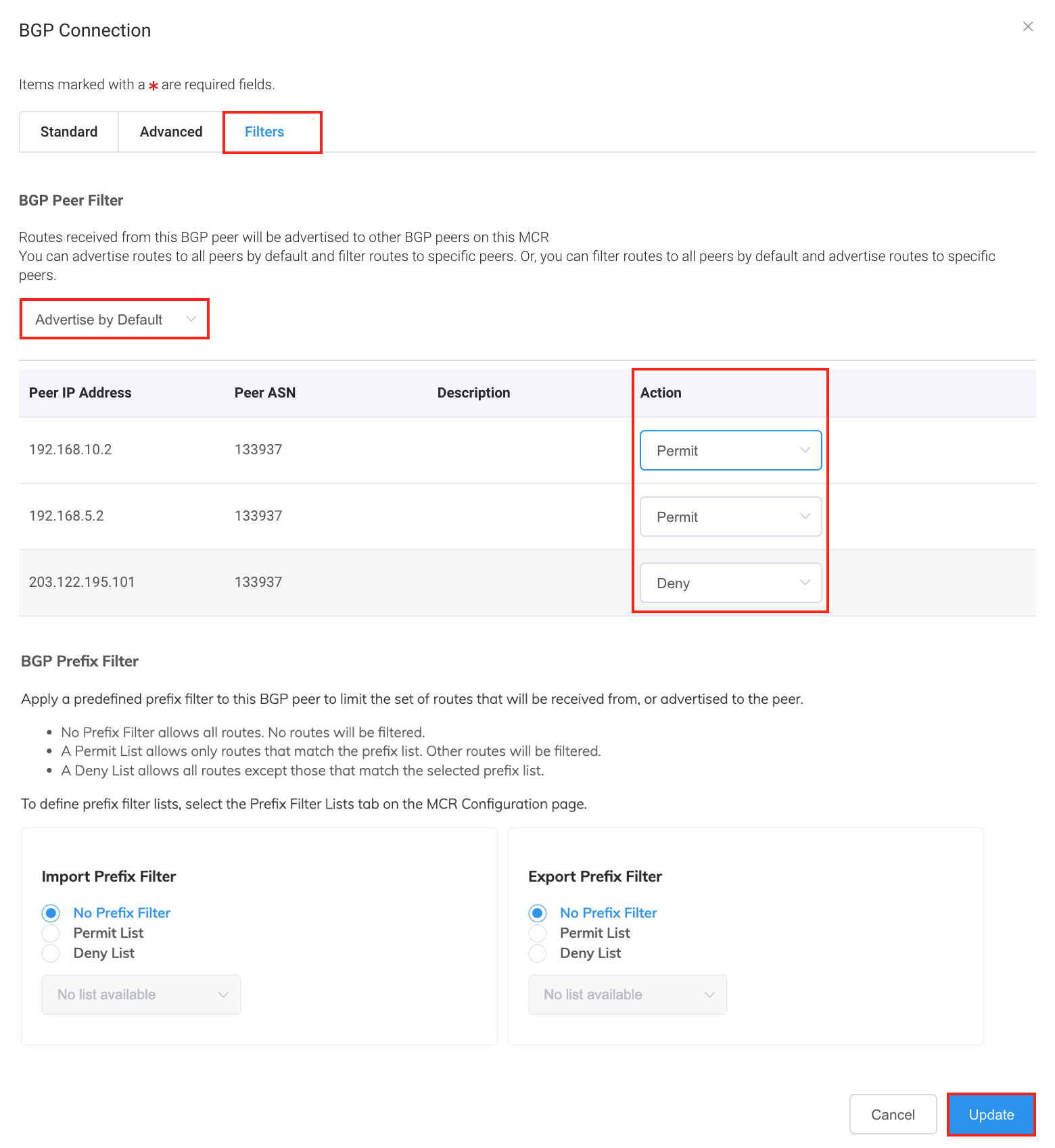
Select the Filters tab.
-
Under BGP Peer Filter, select whether the NAT Gateway should advertise routes received by this BGP connection to BGP peers by default or by exception.
-
Select an action for the BGP peer from the Actions drop-down list:
- Default – Follows the default policy defined by the source peering type BGP connection.
- Permit – Allows routes received from neighbor A to be advertised to neighbor B.
- Deny – Prevents routes received from neighbor A from being advertised to neighbor B.
-
Click Update.
- Click Save.