Diversity in AWS Connections
Diverse connections improve the resiliency of your network by using different physical infrastructure to provide network services. Diverse connections build in redundancy and eliminate single points of failure.
AWS Hosted Connections simplify the deployment of diverse connections by establishing diversity zones. A diversity zone is a group of devices at a single Megaport location. Ports and VXCs in different diversity zones are physically separated on Megaport devices and connected to different AWS devices. During Megaport scheduled maintenance, no more than one diversity zone will experience downtime at any moment. Whenever possible, diverse services have maintenance periods scheduled for different days.
Megaport creates AWS diversity zones by dividing the customer edge routers into two groups. Each AWS destination port indicates its diversity zone with either a red or blue icon.

To create diverse connections, you need to create two connections: one connection for each diversity zone. For end-to-end diversity, the connections must be on diverse ports at both ends.
Note
AWS Hosted Virtual Interfaces (Hosted VIF) do not support diversity zones. To ensure connection diversity for Hosted VIFs, create VXCs to two destination ports in different data centers, instead of two ports in separate diversity zones.
The preferred diversity method deploys connections in different Megaport locations regardless of the diversity zone. This offers the most redundancy and protection. For recommendations from AWS, see AWS Direct Connect Resiliency Recommendations.
Configuration Examples
The following scenarios show a range of configurations with different levels of resilience:
- No Diversity
- Low Resiliency: VXC Diversity
- Single-Site Redundant: Port and VXC Diversity
- High Resiliency: Location, Port, and VXC Diversity
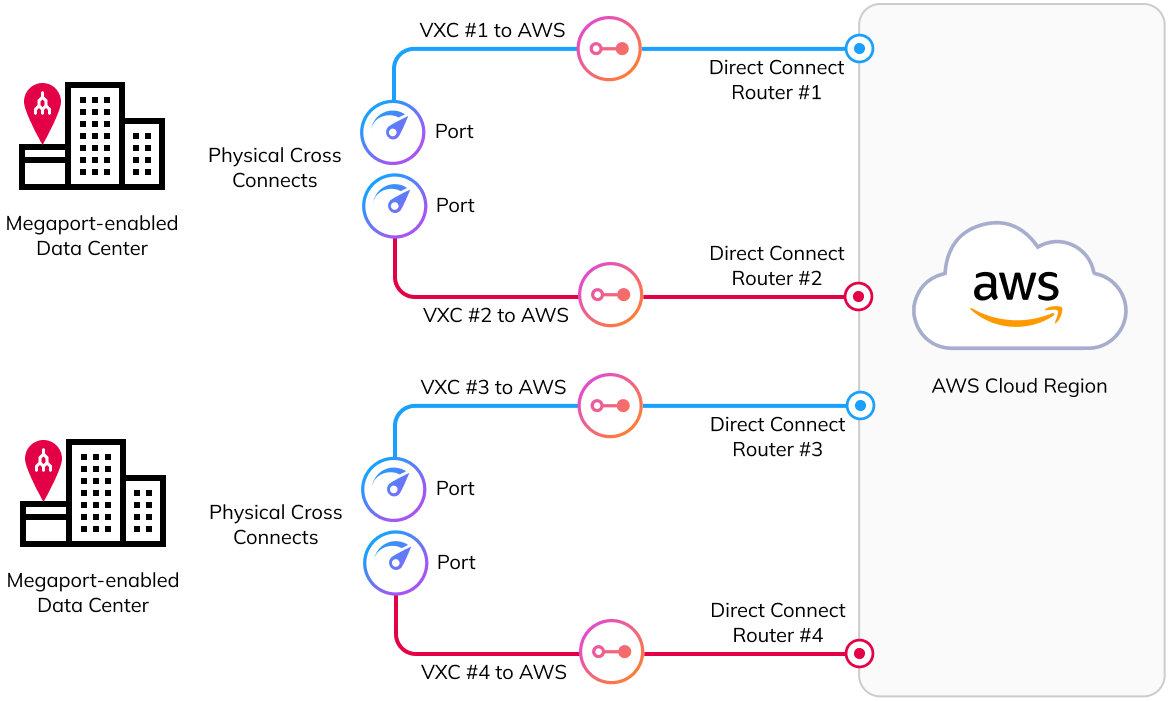
- Maximum Resiliency: Location, Port, and VXC Diversity
No Diversity
Warning
We do not recommend this setup for production applications.
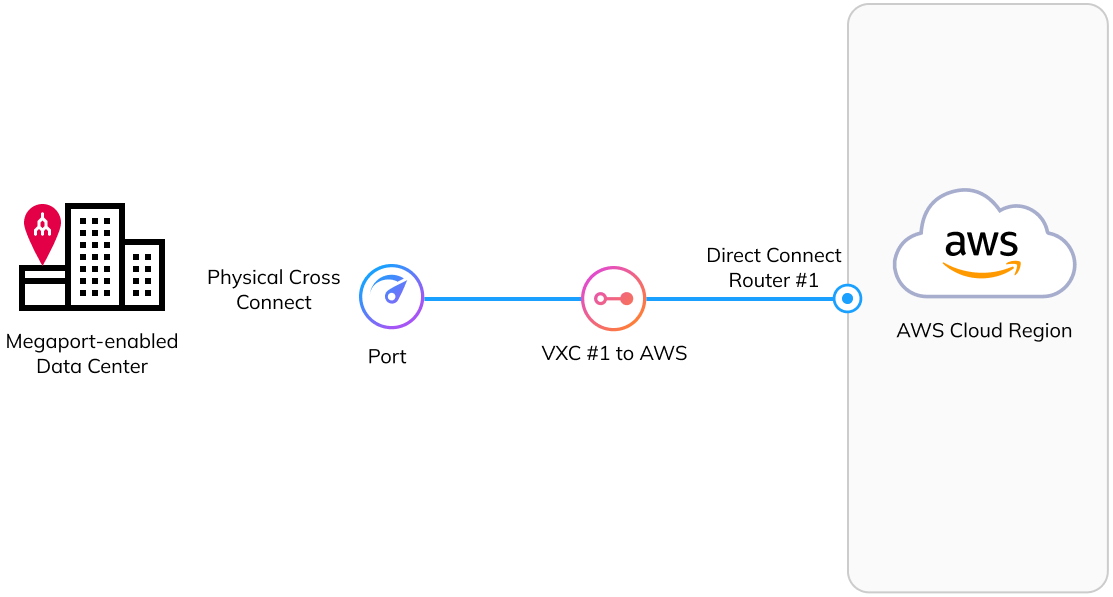
This configuration provides a basic connection to AWS. This configuration requires a single physical cross-connect to a Megaport Port, which connects to an AWS Direct Connect router through a single VXC.
This setup does not provide any redundancy. When Megaport, the data center, or AWS performs maintenance on their component, the connection will be unavailable.
Low Resiliency: VXC Diversity
Note
We recommend this setup for applications that require some resilience, but do not require continuous uptime.
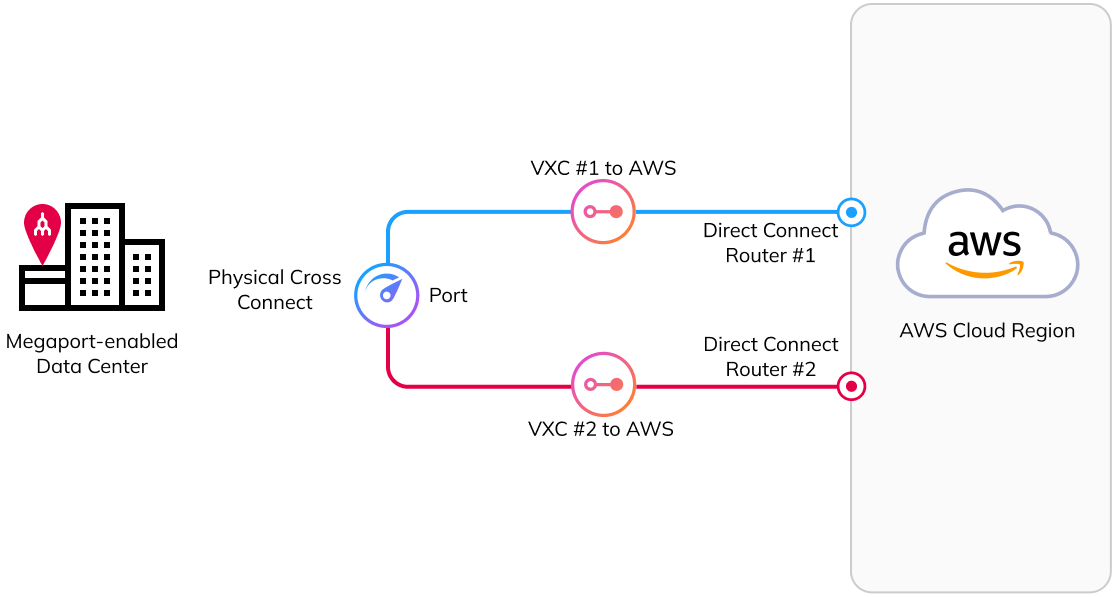
This configuration provides a connection to AWS with VXC diversity. This configuration requires a single physical cross-connect to a Megaport Port. The connection uses two separate VXCs, one in each diversity zone, to connect to two AWS Direct Connect routers.
This setup provides redundancy for the VXCs and the AWS Direct Connect routers. The Port remains a single point of failure. When Megaport or the data center performs maintenance that affects the Port, the connection will be unavailable.
Single-Site Redundant: Port and VXC Diversity
Note
We recommend this setup when you require a high level of connection uptime and resilience from a single data center.
This configuration provides a diverse connection to AWS from a single data center. This configuration uses two separate Megaport Ports, one in each diversity zone, each with a corresponding VXC that connects to two different AWS Direct Connect routers.
This setup provides redundancy for the virtual connections (VXCs), the AWS Direct Connect routers, and the Megaport Ports. If Megaport, the data center, or AWS performs maintenance on any single connection component, the traffic automatically fails over to the other path, and you remain connected.
For the single-site redundant deployment recommendation from AWS, see: Single-Site Redundant Deployment for Non-Critical Workloads.

High Resiliency: Location, Port, and VXC Diversity
Note
We recommend this setup when you require high availability and location diversity for your AWS connection.
This configuration provides a resilient connection to AWS across two different data centers. This configuration uses a Megaport Port in each data center, each in a separate diversity zone. Each Megaport Port has a single VXC that connects to a different AWS Direct Connect router.
This setup provides redundancy for the VXCs, the AWS Direct Connect routers, and the Megaport Ports. It also provides location diversity by having the Ports in separate data centers. If Megaport, a data center, or AWS performs maintenance on a single connection component, the traffic automatically fails over to the other path, and you remain connected.
For the multi-site, non-redundant deployment recommendation from AWS, see: High Resiliency: Multi-Site Non-Redundant Deployment for Critical Production Workloads.

Maximum Resiliency: Location, Port, and VXC Diversity
Note
We recommend this setup when you require a high level of connection uptime, resilience, and location diversity for your mission-critical applications.
This configuration provides a highly available and fully diverse connection to AWS, utilizing redundancy across two different data centers. This configuration uses two Megaport Ports in each data center, with connections established in both diversity zones. All four Megaport Ports have a VXC connecting to the AWS Direct Connect service, providing multiple failover paths.
This setup VXC, AWS Direct Connect, Megaport Port, and location diversity. If Megaport, a data center, or AWS performs maintenance on any single connection component, traffic automatically fails over to one of the remaining paths, and the connection will remain available.
For the multi-site, redundant deployment recommendation from AWS, see: Maximum Resiliency: Multi-Site Redundant Deployment for Critical Production Workloads.