Locking Megaport Services
If you are a Company Admin user, you can lock Ports, Megaport Cloud Routers (MCRs), Megaport Virtual Edges (MVEs), Internet Exchanges (IXs) and other Megaport services to prevent modification or deletion. For information about user roles such as Company Admin, see Managing User Roles.
You can lock a service while it is still provisioning; the service does not need to be Live. For example, you can lock a configured Port that is awaiting its Cross Connect. Unlocking is available regardless of provisioning status.
Note
Locking is not available for services that are in your cart, or that have been cancelled, decommissioned, or have failed. When locking is unavailable, the padlock icon is grayed out.
To lock a Port service
- In the Megaport Portal, go to the Services page.
- Click the padlock icon next to the service you want to lock.
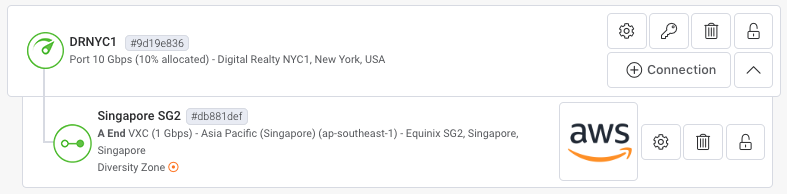
Example 1: A Port (DRNYC1) has a VXC attached (Singapore SG2). The padlock icons on the Port and VXC indicate that the Port’s provisioning status is Live, traffic is traversing across the VXC, and both services can be locked.
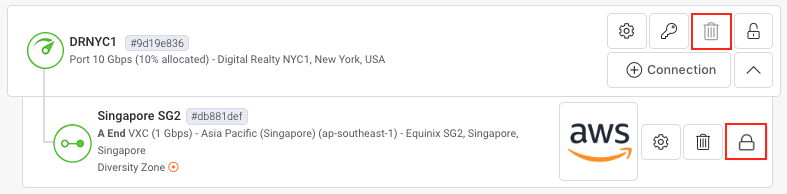
Example 2: The same Port and VXC are shown; however, even though the Port is unlocked, the VXC remains locked. When a single VXC is locked, it is not possible to delete the VXC, the Port, or any attached services (as indicated by the grayed out Delete Port icons). To delete the Port, a Company Admin must unlock the VXC first.
To lock an Internet Exchange or Virtual Cross Connect service
- In the Megaport Portal, go to the Services page.
- Click the padlock icon next to the Megaport service you would like to lock.

User role permissions
If an Admin user below Company Admin (such as a Technical Admin or Finance Admin user) has permission to make changes, they still won’t be able to delete or edit any locked Megaport service. Only a Company Admin can unlock the service. Other users receive the following warning if they attempt to make a change.

Users at access levels below Company Admin can perform the following tasks:
-
Add VXCs/IX services to locked Megaport services – Additional services will not be set to Locked status. By default, they will be set to Unlocked.
-
View details of locked Megaport services – If a service is locked, its status can be viewed on the Details page.