Megaport Internet Routing Guide
This topic describes standard Megaport Internet configuration and how you can configure Border Gateway Protocol (BGP)Border Gateway Protocol (BGP) is a standardized routing protocol designed to exchange route and reachability information among autonomous systems (AS) on the internet.
on Megaport Internet connections.
Megaport InternetMegaport Internet connections are scalable, on-demand services that allow you to connect to the internet from Ports, MCRs, and MVEs. As part of the MVE provisioning, you create a Megaport Internet connection to provide connectivity and to allow MVE to register and communicate with the SD-WAN overlay network.
is available for PortsA Port is the high-speed Ethernet interface that connects to Megaport’s global software-defined network (SDN). Ports are available in 1 Gbps, 10 Gbps, 100 Gbps, or higher speed options, depending on location and service availability.
, MCRsThe MCR is a managed virtual router service that establishes Layer 3 connectivity on the worldwide Megaport software-defined network (SDN). MCR instances are preconfigured in data centers in key global routing zones. An MCR enables data transfer between multicloud or hybrid cloud networks, network service providers, and cloud service providers.
, and MVEsThe MVE is an on-demand, vendor-neutral Network Function Virtualization (NFV) platform that provides virtual infrastructure for network services at the edge of Megaport’s global software-defined network (SDN). Network technologies such as SD-WAN and NGFW are hosted directly on Megaport’s global network via Megaport Virtual Edge.
in selected countries. For the latest information on Megaport Internet availability, see Locations available. You can access the product by ordering a Megaport Internet connection to a Megaport internet router.
Multiple diversity zones are available in all metros where Megaport Internet is available. For maximum resiliency, connect to both zones by matching red to red and blue to blue. Additional resiliency is available by connecting to Megaport Internet in an additional nearby metro. For more information, see Port Diversity, MCR Diversity, and MVE Diversity.
All Megaport Internet connections are assigned IPv4 and IPv6 addresses as standard and configured as follows:
-
/31 Point-to-point IPv4 network
-
/64 Point-to-point IPv6 network
-
DHCPDynamic Host Configuration Protocol (DHCP) is a client/server protocol that automatically provides an Internet Protocol (IP) host with its IP address and other related configuration information such as the subnet mask and default gateway.
is enabled for IPv4 and will permanently offer the same static IPv4 address. -
IPv6 router advertisements are enabled for SLAAC-capable IPv6 clients.
-
It is not required to use the dynamic address assignment methods. The address information is also available in the Megaport Portal and you can configure your equipment with static addresses from the assigned range.
-
Megaport adheres to BCP 38. Packets sent to Megaport must have a valid source address in the assigned IPv4 or IPv6 ranges.
-
To protect against abuse of Megaport IP address space for the sending of spam, Megaport filters outgoing connections to TCP port 25 when the source address is a Megaport-owned IP address. Customer-supplied address space is not filtered. Exceptions for specific IP addresses can be made upon request, with valid justification.
Requesting additional IP addresses
After your Megaport Internet connection is live, you can request additional IP addresses. There is a charge for additional IP addresses. The request for a public IP address is added to the Megaport Internet connection. Megaport Customer Support will review the additional IP address request within 48 hours of submission.
Public IP address requests have the following restrictions:
-
They must be ordered for a term of 12 months or more.
-
The Megaport service (Port, MVE, MCR) must also be ordered for a term of 12 months or more.
-
Megaport-assigned IP address space must be advertised only on Megaport Internet services. Advertising these networks to other Megaport services or third party providers is forbidden.
Note
You must have at least Technical Admin privileges to perform this action. For more information, see Managing User Roles.
To request a public IP address for a Megaport Internet connection
Add the IP address request to the Megaport Internet connection after it has been configured or is live.
-
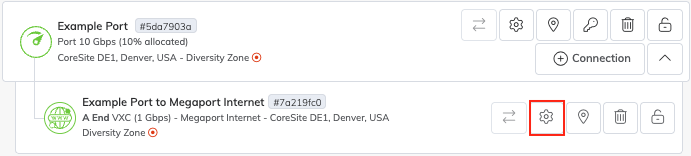
In the Megaport Portal, go to the Services page and find the Megaport Internet connection that you want to update.
-
Click the gear icon next to the connection.
-
Click Megaport Internet.
Note
The image below shows the edit Connection Details page for a Megaport Internet connection on a Port. For a Megaport Internet connection on an MCR, the Megaport Internet entry will be in a different position.

-
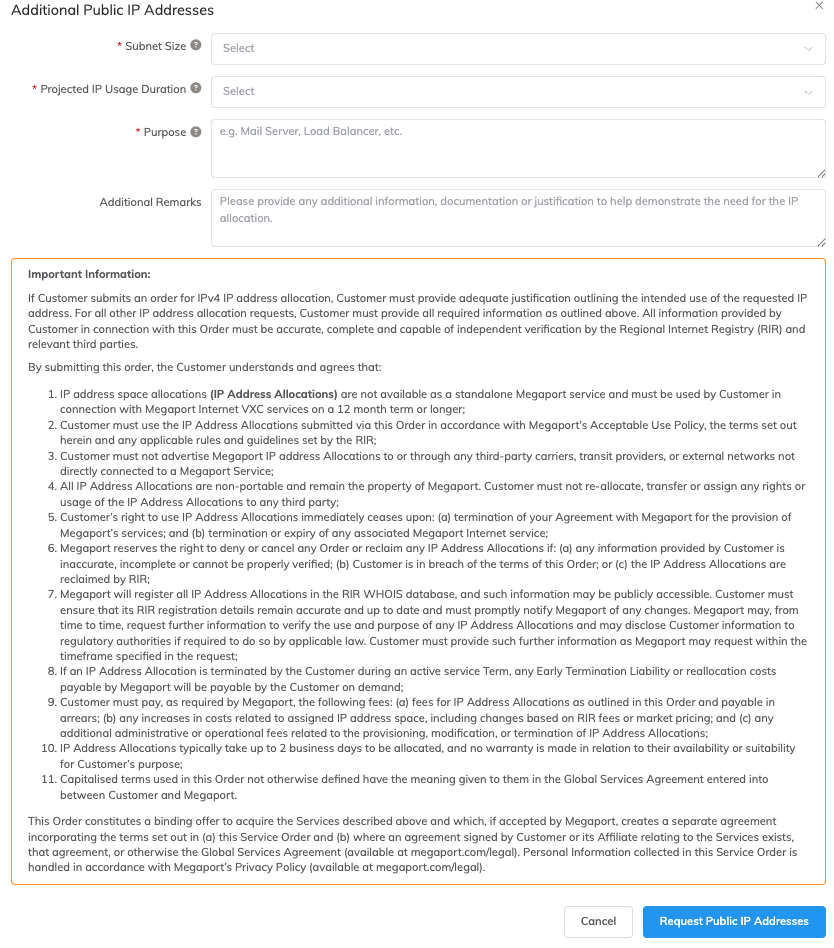
Click Request Public IP Addresses.
-
Enter these details:
-
Subnet Size – Select the size from the drop-down list.
The monthly rate will appear under the Subnet Size field when you have chosen a subnet size. -
Projected IP Usage Duration – Select the duration from the drop-down list. The duration must be at least 12 months. This information is collected by the Regional Internet Registry (RIR) for it to plan efficient use of resources.
-
Purpose – Enter a description of the intended purpose of the allocated subnet.
This information is also collected by the RIR for it to plan efficient use of resources. -
Additional Remarks – Enter any additional information that further explains the request.
-
-
Read the Important Information on this page.
Note
Read the Important Information carefully, as accepting the terms results in a legal agreement.
-
Click Request Public IP Addresses to accept the conditions, and submit your request for additional public IP addresses.
A window will appear confirming that your request has been accepted. You will also receive a confirmation email with the details of your request. The request will be processed within 48 hours. -
Click OK.
Megaport Customer Support will review the additional IP address request within 48 hours of submission. When your request has been processed, you will receive an email to your company account confirming the subnet size and cost, and explaining the next steps in the process.
Enabling BGP
You can request BGP on new and existing Megaport Internet VXCs. With BGP enabled:
- Customers might advertise Megaport assigned IP blocks or their own provider independent IP addresses (see BGP filtering).
-
Megaport configures an IPv4 and IPv6 BGP neighbor.
-
Megaport uses the first IP address and configures the BGP neighbor as the second IP address in the point-to-point network.
-
You can optionally provide a BGP password.
-
Source address filtering permits only Megaport-assigned IP addresses and prefixes that customers have provided for advertisement over BGP.
-
Megaport sets a minimum BGP hold timer of 20 seconds. A BGP connection will not establish if you configure a value lower than this on your router.
Note
BFDBidirectional Forwarding Detection (BFD) is a network fault detection protocol that detects any path failures between directly connected BGP neighbors. It provides fast failure detection times, which facilitates faster re-convergence time for dynamic BGP routing protocols. It is independent of media, routing protocol, and data.
is not currently supported with Megaport Internet.
Requesting BGP on Megaport Internet connections
You can enable BGP configuration details on a Megaport Internet connection when it is live. To add BGP details, edit the Megaport Internet connection and provide the BGP details. To configure BGP for your Megaport Internet connection, you must provide these details:
-
Customer ASNAn autonomous system (AS) is a collection of connected Internet Protocol (IP) routing prefixes under the control of one or more network operators on behalf of a single administrative entity or domain. ASN refers to autonomous system number and is a unique numerical ID allocated to each AS for use in BGP routing.
-
BGP Password (optional) – You can add a password for your BGP entry, or you can leave this field blank.
-
Prefixes (optional) – A list of publicly assigned IPv4 or IPv6 networks to be advertised.
-
AS-SET – A list of ASNs used to define routing policies and filter prefixes from multiple ASNs.
BGP requests will be reviewed by Megaport Customer Support before being implemented.
To request BGP settings on a Megaport Internet connection
The BGP settings can be added to the Megaport Internet connection when the service has been provisioned.
Note
You must have at least Technical Admin privileges to perform this action. For more information, see Managing User Roles.
-
In the Megaport Portal, go to the Services page and find the Megaport Internet connection that you want to update.
-
Click the gear icon next to the connection.
-
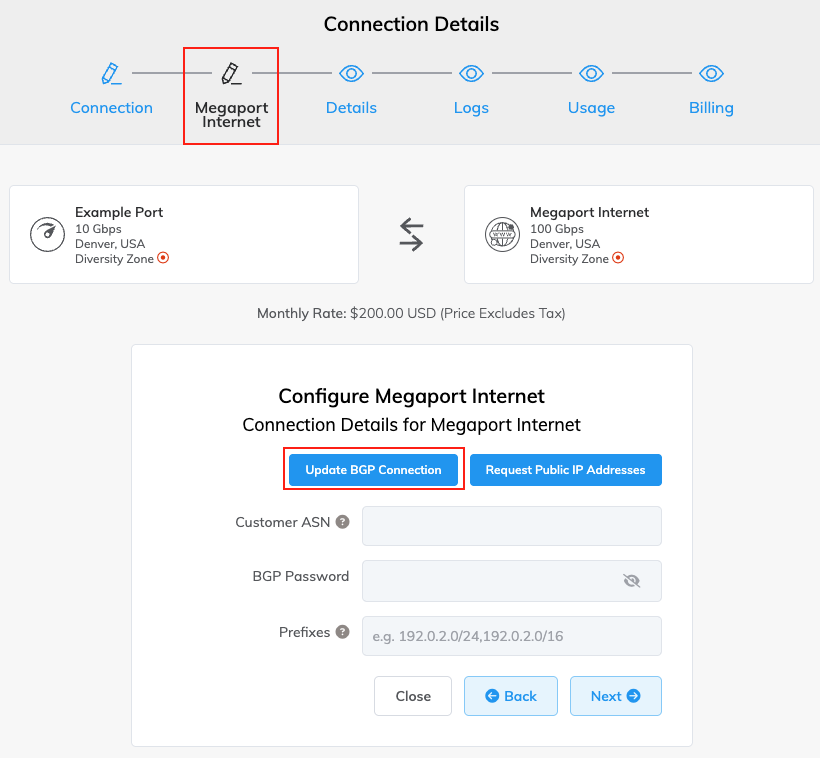
Click Megaport Internet.
Note
The image below shows the edit Connection Details page for a Megaport Internet connection on a Port. For a Megaport Internet connection on an MCR, the Megaport Internet entry will be in a different position.
-
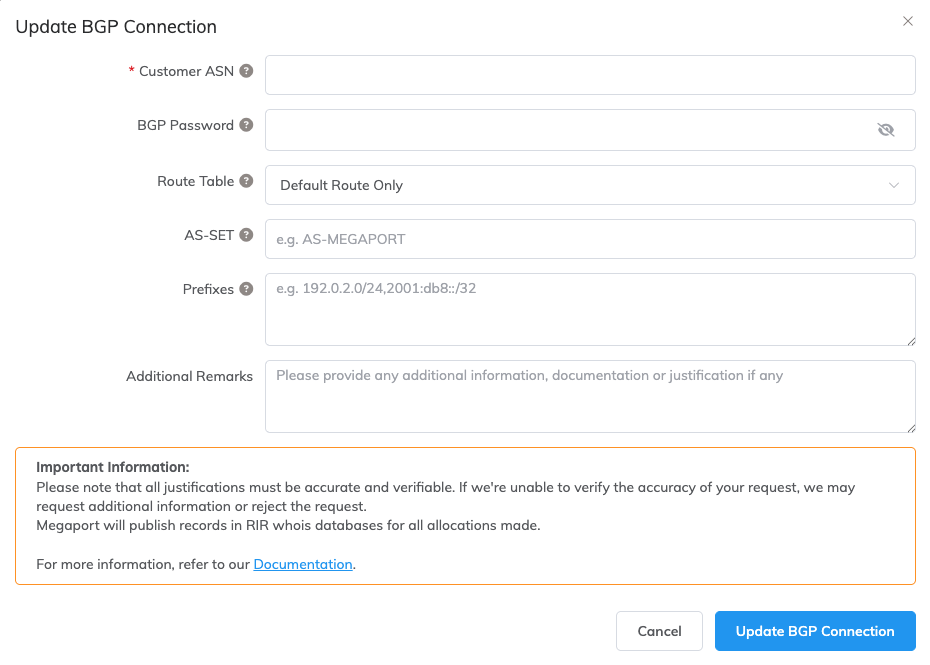
Click Update BGP Connection.
-
Enter these details:
-
Customer ASN
- Must be a valid public or private BGP ASN.
- Mandatory if entering BGP details.
- For more information, see Using private AS numbers.
-
BGP Password (optional)
- The allowed password length is from 1 to 25 characters.
- The password can include any of these characters:
- a-z
- A-Z
- 0-9
- ! @ # . $ % ^ & * + = - _
-
Route Table
- Select your routing preference from the drop-down list.
- Ensure that valid route objects are created in the appropriate Regional Internet Registry (RIR) or Routing Assets Database (RADb) for all advertised networks.
- Your selection determines how routes are advertised.
- Each option advertises an increasing number of routes.
- For more information, see Advertised routes.
-
Prefixes (optional)
- A list of publicly assigned IPv4 or IPv6 networks to be advertised
- The list must be entered as a comma-separated list.
For example, 192.0.2.0/24, 192.0.2.0/30. - For more information, see BGP filtering.
-
AS-SET (optional)
- A list of ASNs used to define routing policies and filter prefixes from multiple ASNs.
- Multiline input required.
- Entries must be separated by a comma.
-
Additional Remarks (optional)
- Add any additional information or justification.
-
-
Click Update BGP Connection to submit your changes.
Megaport Customer Support will review the request. If everything is in order, you will receive an email with the next-step instructions.
If there are any issues with the request, Megaport Customer Support will contact you.
BGP filtering
You can optionally provide a list of IPv4 and IPv6 prefixes that you want to advertise.
-
Prefixes must be publicly assigned addresses and owned by the customer, or the customer must provide an LOA from the owner authorizing their use.
-
Prefix length must be between /12 and /24 for IPv4 prefixes.
-
Prefix length must be between /24 and /48 for IPv6 prefixes.
Megaport will filter out any advertised prefixes not listed.
Megaport performs RPKIResource Public Key Infrastructure (RPKI) is a public key infrastructure framework that is designed to support improved security for the internet’s Border Gateway Protocol (BGP) routing infrastructure. RPKI provides a way to connect internet number resource information (such as autonomous system numbers and IP addresses) to a trust anchor.
filtering. Invalid routes are filtered. For more information, see RPKI.
Megaport automatically permits longer prefixes down to /32 for IPv4 and /128 for IPv6 in our filters. This allows you to share a single /24 (IPv4) or /48 (IPv6) route across multiple Megaport Internet services within the same metro area.
Prefixes longer than /24 and /48 are not exported to external neighbors.
The maximum number of BGP prefixes accepted is 4x the number of registered prefixes to allow for limited traffic engineering using more specific routes.
Megaport will not install routes from transit or peering sources that fall within a customer’s advertised prefixes. All traffic destined for addresses within a customer’s advertised prefix range will be routed via the customer’s Megaport Internet service, even if a more specific route exists via an external path.
Megaport sets a high local-preference on customer BGP routes.
Route objects must be created with the relevant Regional Internet Registry (RIR) or Routing Assets Database (RADb) for all networks, regardless of whether the network uses private or public ASNs. For statically routed networks or private ASNs, route objects must specify the origin of AS49915.
Note
Upstream filters can take up to 48 hours to update after the service has been configured. During this period, newly created or modified routes might not propagate to the internet completely.
Advertised routes
You can choose from four options, with an increasing number of routes. If you do not specify your preferred option, Megaport will only advertise a default route.
Note
Megaport always advertises a default route with all routing options.
Routing options:
-
Default Route – A locally originated default route (one route).
-
Customer Routers – In addition to the above, this includes the routes of Megaport customers.
-
Customer and Peer Routes – In addition to the above, this includes the routes of Megaport peers.
-
Full Routes – In addition to the above, this includes a complete internet routing table (>900,000 routes).
Megaport internal communities and private communities are removed from outbound route announcements.
Traffic engineering communities
You can set these communities to influence the advertisement of your routes to other neighbors.
TE communities are stripped on egress.
| Large Community | Standard Community | Action |
|---|---|---|
| 49915:65000:0 | 65000:0 | Do not export |
| 49915:65000:ASN | 65000:ASN | Do not export to ASN |
| 49915:65001:0 | 65001:0 | Prepend once |
| 49915:65001:ASN | 65001:ASN | Prepend once to ASN |
| 49915:65002:0 | 65002:0 | Prepend twice |
| 49915:65002:ASN | 65002:ASN | Prepend twice to ASN |
| 49915:65003:0 | 65003:0 | Prepend three times |
| 49915:65003:ASN | 65003:ASN | Prepend three times to ASN |
| 65535:65284 | nopeer Do not advertise to any bilateral or route-server peers |
Using private AS numbers
Megaport supports BGP for customers that do not have a public AS number, using private AS numbers.
You can choose your ASN from either the 2-byte or 4-byte private ranges.
All routes Megaport advertises upstream will have private AS numbers stripped from the AS path. This might result in Megaport appearing to be the origin of the prefix. If the network owner has published RPKI ROA records, you might need to create additional ROAs permitting Megaport AS49915 to advertise the route.
Helpful references
- Contacting Support
- Creating a Megaport Internet Connection for a Port
- Creating a Megaport Internet Connection for an MCR
- Creating a Megaport Internet Connection for an MVE
- Creating a Megaport Internet Connection for a NAT Gateway
- Creating a Megaport Internet Connection from a Port with the API
- MCR Diversity
- Monitoring Ports, VXCs, Megaport Internet, and IXs
- MVE Diversity
- Port Diversity
- Terminating a Megaport Internet Connection
- Troubleshooting Megaport Internet Connectivity