Megaport NAT Gateway Overview
A Megaport NAT Gateway (NAT Gateway) is a Network Address Translation (NATNetwork Address Translation (NAT) translates private, unregistered IP addresses used within an organization’s internal network into a single registered public IP address before sending packets to an external network. NAT enables private IP networks to access the internet and cloud services.
) service that enables devices in a private network to access the internet without requiring each device to have a public IP address.
NAT Gateways provide several key benefits:
- Hides internal IP addresses using Source NAT (SNAT), keeping your private network topology invisible to external endpoints.
- Improves security by blocking incoming connections and preventing external entities from directly accessing private resources.
- Provides internet access for private subnets so devices can access the internet or external services.
- Conserves IP addresses by using a single public IP address or a pool of public IP addresses for all outbound traffic from private resources.
- Scales to manage high traffic volumes and a high number of concurrent translations efficiently.
- Lowers egress costs by routing outbound internet traffic through a single centralized service rather than individual cloud-provider NAT offerings.
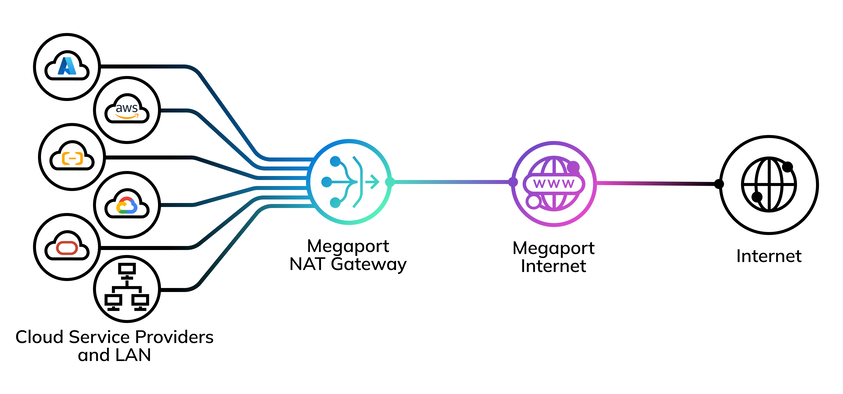
How it works
Devices inside private networks have private IP addresses. When a device in a private network starts a connection to a resource outside the private network, a NAT Gateway translates the device’s private IP address into a public IP address.
NAT allows devices on the private network to communicate with external networks while keeping internal IP addresses hidden.
A Megaport NAT Gateway can translate all traffic to an IP address or to a range of addresses based on rules.
When a device on a private network requests information from the internet through a NAT Gateway:
- The device in a private subnet sends a request to the internet. This request is routed through the NAT Gateway.
- The NAT Gateway replaces the source IP with its own public IP address and adds an identifier so that it can forward the response to the source device.
- The request is sent to the destination, such as a web server or an API server on the internet.
- The response comes back to the NAT Gateway, which translates the public IP back to the original private IP.
- The response is sent to the source device, completing the request.
Megaport NAT Gateway sizes
Megaport NAT Gateways are available with the following limits:
| Session Count | Rate Limits in Gbps |
|---|---|
| 250,000 | 1, 2.5, 5, and 10 |
| 500,000 | 10 and 25 |
| 1,000,000 | 10, 25, and 50 |
| 2,500,000 | 10, 25, 50, and 100 |
| 5,000,000 | 10, 25, 50, and 100 |
| 10,000,000 | 10, 25, 50, and 100 |
Difference between MCR NAT and Megaport NAT Gateway
How MCR NAT works
The Megaport Cloud Router (MCR) employs Overload NAT, a combination of Source NAT (SNAT) and Port Address Translation (PAT) to map multiple internal IP addresses to a single, globally unique IP address for outbound connectivity.
By assigning unique source ports to each session, the MCR ensures distinct communication paths while hiding internal network topologies from external partners, such as cloud providers or the internet.
Although typically used to translate private IP addresses to public IP addresses for egress traffic, the system is flexible enough to translate any IP address type on either interface, making it an essential tool for navigating addressing requirements and resolving subnet overlaps. For more information, see How MCR Performs NAT.
How Megaport NAT Gateway works
NAT Gateways also employ Overload NAT, Source NAT (SNAT), and Port Address Translation (PAT). They can manage larger traffic volumes, supporting over 1 million connections per second and up to 30 million total translations.
NAT Gateways specialize in processing intensive NAT operations, ensuring that they do not bottleneck the system, maintaining the high-speed throughput required for 100 Gbps networking environments.
Helpful references
- A Guide to NAT Gateway
- Creating a NAT Gateway
- Creating a NAT Gateway VXC
- Configuring a NAT Gateway
- Configuring a NAT Gateway VXC
- Configuring Advanced BGP Settings
- Configuring BGP for Megaport NAT Gateway
- How MCR Performs NAT
- Introducing Megaport NAT Gateway
- NAT Gateway Diversity
- NAT Gateway Features
- NAT Gateway Limits and Quotas
- NAT Gateway Pricing and Contract Terms
- Terminating a Megaport NAT Gateway
- Using NAT Gateway Pools