Megaport Global Mesh WAN Overview
Megaport Global Mesh WAN is a fully managed, cloud-ready Wide Area Network (WAN) service built for organizations with distributed locations. Unlike traditional setups that require a direct point-to-point connection between every site, Megaport Global Mesh WAN enables seamless and flexible connectivity among multiple data centers and sites.
Megaport Global Mesh WAN provides a secure, scalable, and cost-effective solution for interconnecting offices, data centers, and cloud regions globally. It effectively eliminates the complexity of traditional WAN provisioning by seamlessly integrating your Megaport services.
Leveraging its underlying Megaport mesh architecture, the service provides you with resilient, low-latency paths between all sites, alongside the flexibility to scale bandwidth on demand.
Megaport Global Mesh WAN delivers predictable performance, reduces operational overhead, and offers an affordable model designed to meet stringent security and compliance requirements.
Key benefits of Megaport Global Mesh WAN
- Global reach – Connect distributed sites, data centers, and clouds across multiple regions seamlessly.
- Resilient architecture – Megaport’s mesh design and red and blue zone diversity deployment ensure high availability, redundancy, and optimized traffic flows.
For more information about diversity zones, see Port Diversity, MCR Diversity, and MVE Diversity. - Scalable and elastic – Instantly adjust bandwidth and extend your network reach without complex re-engineering.
- Cost-effective – Achieve enterprise-grade connectivity at a fraction of the cost of traditional WAN solutions.
- Premium support – Access a dedicated Megaport Technical Account Manager (TAM) for proactive guidance and continuous support for your WAN environment.
Types of Megaport Global Mesh WAN
Megaport offers these types of Mesh WAN services:
| WAN Type | Deployment Strategy |
|---|---|
| Domestic WAN | Required services are deployed in Megaport-enabled locations that are all located within the same country. This ensures localized, low-latency connectivity for national resources. This service is currently available in Australia, Canada, and the USA. |
| Regional WAN | Required services are deployed in Megaport-enabled locations across multiple countries within the same region. This service is available in Asia-Pacific (APAC), Europe, the Middle East, and Africa (EMEA), North America (NAM), and Latin America (LATAM) regions. |
| Trans Atlantic WAN | Required services are deployed on both sides of the Atlantic Ocean. This service is available for routes between the US and Europe. |
| Global WAN | Required services are deployed across numerous regions worldwide, including APAC, EMEA, NAM and LATAM. Your network infrastructure is unified into a single logical mesh network. |
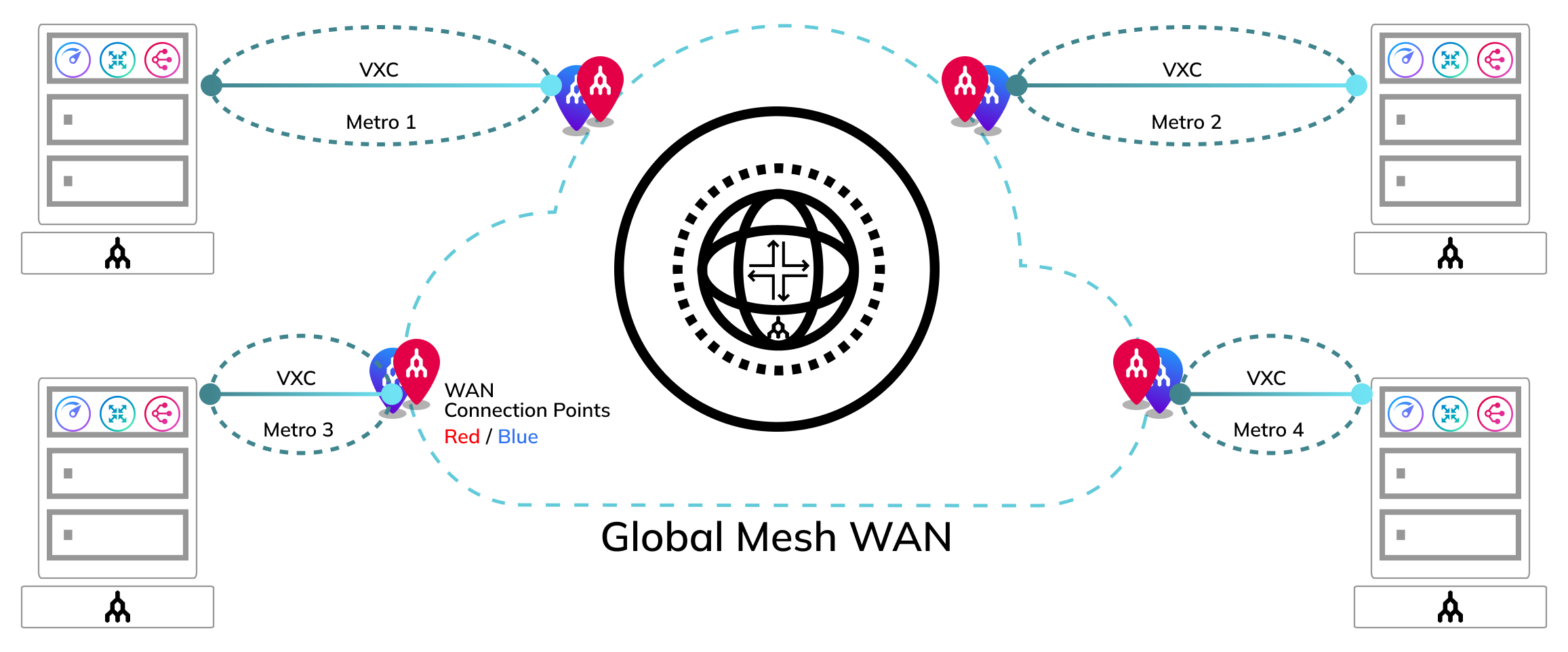
The following network diagram represents the fundamental concept of the Megaport Global Mesh WAN. The structure is consistently applied irrespective of the geographical scope of the four types of Global Mesh WAN. Megaport handles the entire mesh infrastructure, completely offloading your network management workload. You only need to establish connections to your chosen locations within the mesh via Virtual Cross Connects (VXCs).
Ordering Megaport Global Mesh WAN
Below is a step-by-step workflow that describes how to order a Megaport Global Mesh WAN.
-
Contact your Megaport Account Manager or Solution Architect to discuss your requirements. We will use those requirements to design a network solution that meets your needs.
-
After you and Megaport agree on the proposed solution, your Megaport Account Manager will provide a Manual Service Order (MSO) form for your review and acceptance of pricing, terms, and conditions.
-
After you sign the MSO, your Megaport account team will configure the network as designed. If you need additional implementation support, tell your account team, and Megaport will introduce you to a Technical Account Manager (TAM) to discuss professional services.
-
You can then use these services through the Megaport Portal.