Megaport NAT Gateway Route Filtering
This topic provides an overview of Megaport NAT Gateway (NAT Gateway) route filtering concepts.
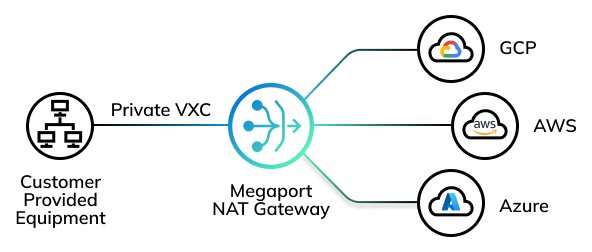
Route filtering overview
Route filtering provides control over NAT Gateway route installation and propagation, typically between two or more networks. The networks can be either on-premises or a Cloud Service Provider (CSP).
Route filters are optional and can be used to:
- redistribute or prevent redistribution of routes between Virtual Cross Connects (VXCs).
- create a BGP prefix filter that includes a set of IPv4 or IPv6 CIDR blocks to manage as a group.
- allow or deny specific routes on specific connections.
Default peering route advertisements
NAT Gateways use Border Gateway Protocol (BGP)Border Gateway Protocol (BGP) is a standardized routing protocol designed to exchange route and reachability information among autonomous systems (AS) on the internet.
to exchange network reachability information with adjacent BGP systems, known as neighbors, or peers. NAT Gateways work in multicloudThe use of multiple cloud computing services in a single heterogeneous architecture. For example, an enterprise might use multiple cloud providers for infrastructure (IaaS) and software (SaaS) services. One of Megaport’s core value propositions is enabling multicloud connectivity.
architectures that are connected using different combinations of peering types. In addition to private peering connectivity, NAT Gateways can connect to public peering types such as AWS, Azure, Oracle, and other Cloud Service Providers (CSPs).
BGP communicates between two neighbors using a standard TCP connection. By default, once the BGP neighbors are connected, they share routing information with each other. The connection between the neighbors is called a BGP connection or session.
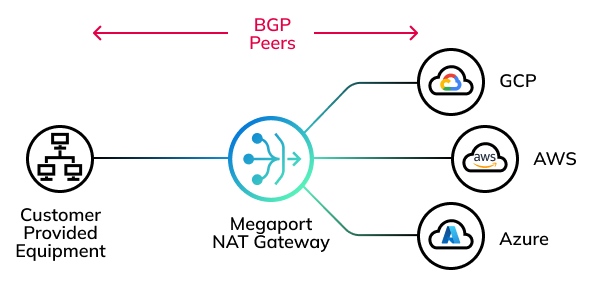
Without using any route filters, Megaport advertises routes to BGP connections based on these peering types:
| Peering Type | Routes Advertised | Advertised To |
|---|---|---|
| Non-cloud | Routes from the Border Gateway Protocol (BGP) peer behind a Port. | Non-cloud, private cloud, public cloud |
| Private cloud | Routes from AWS Private, Azure Private Peer, and Google Cloud Platform. | Non-cloud, private cloud |
| Public cloud | Routes from AWS Public, Azure MS Peer, Salesforce, and other cloud providers. | Non-cloud |
As an example, a route received from a public cloud BGP connection will not be advertised to a private cloud BGP connection.
You cannot override or control the peering type route advertisement.
Route filtering doesn’t change this existing peer type policy but provides finer control when you need to filter specific routes or prefixes that would have otherwise been discovered and exchanged between BGP neighbors. Route filters cannot be used to advertise routes that are already filtered based on the peer type.
For the default route advertisement details, see Megaport NAT Gateway Route Advertisement.
Selecting a filter type
You can set a route filter to define which route advertisements the NAT Gateway permits or denies from BGP neighbors. You can filter routes by BGP connection or by prefix. Route filtering supports IPv4 and/or IPv6 routes for each format.
The two filter types are:
-
BGP peer filter – A filter that permits or denies all routes exchanged between BGP neighbors. For example, in a network deployment with BGP neighbors A, B, and C, A and B are allowed to exchange routes with each other but not with C, while all neighbors can exchange routes with headquarters. BGP peer filtering provides a simple way to filter routes between the neighbors to meet these requirements.
For more information, see Megaport NAT Gateway BGP Peer Filtering.
-
BGP prefix filter – An advanced filter that permits or denies specific routes using route prefixes (IP addresses or ranges) to identify individual neighbors. You can apply the same prefix filter to more than one BGP neighbor, eliminating the need to type manual, redundant prefix entries. You can specify a permit or deny action for each prefix in the filter list. You can apply different lists using import or export directions.
For more information, see Megaport NAT Gateway BGP Prefix Filtering.