使用 API 建立到 AWS 的 VXC
本主題說明使用 API 從 Port 建立到 AWS 的 VXC 的流程,包括如何查詢雲端互連位置、驗證連線,以及訂購 VXC。
本主題中的範例會建立一個到 AWS 的 Hosted VIF 連線,資料速率為 500 Mbps。若要逐步完成此範例,請使用 staging 環境的 URL,此環境可讓你設定連線,但不會部署或對服務收費。
開始前,請先取得有效的存取權杖。想了解更多,請參閱 建立 API 金鑰。
提示
若要查看此範例所用要求的所有選項,請前往 https://dev.megaport.com。
查詢 AWS 連接埠位置詳細資料
若要建立到 AWS 的 VXC,你需要知道 AWS 連接埠的詳細資料。使用 API 取得 Megaport 與雲端服務供應商之間的介面清單,以識別所需的 AWS 連接埠詳細資料。
在 Postman 集合中查詢 AWS 連接埠位置詳細資料
-
在左側導覽展開 Locations (位置) 資料夾,並按一下 GET Partner Megaports (取得合作夥伴 Megaports)。
-
按一下 Send (傳送) 以向 API 伺服器發出 GET 要求。
GET {baseUrl}/v2/dropdowns/partner/megaports此要求會傳回 Megaport 與雲端服務供應商之間的所有介面。你可以按一下放大鏡圖示,並在搜尋欄位中輸入位置、資料中心或其他參數進行搜尋。
connectType 表示雲端服務供應商。針對 AWS,Hosted VIF 使用 “AWS”,Hosted Connections 使用 “AWSHC”。
你可以依據
connectType與vxcPermitted篩選結果。GET {baseUrl}/v2/dropdowns/partner/megaports?connectType=AWS&vxcPermitted=true此範例使用 Interxion DUB2 中一個可接受 VXC(
“vxcPermitted”: true)且位於 eu-west-1 區域的連接埠。
      {
            "connectType": "AWS",
            "productUid": "6cc21ccb-5ecc-4869-ab0e-b3fa17f5110f",
            "vxcPermitted": true,
            "companyUid": "623cb950-abb4-4b07-b372-8cf55756c322",
            "companyName": "AWS",
            "title": "EU (Ireland) (eu-west-1)",
            "locationId": 96,
            "speed": 10000,
            "rank": 61,
            "lag_id": 2,
            "lag_primary": true,
            "aggregation_id": 54188
        },
建立並部署 VXC
使用從 GET Partner Megaports API 取得的 AWS Port 詳細資訊,您可以驗證並建立 VXC。
測試並驗證訂單
-
在 Postman 中,展開左側導覽的 Cloud Connectivity > Port > AWS Direct Connect,然後選取 POST Validate AWS - Hosted VIF (v3)。
-
於請求的 Body 中更新 Port 的
productUid、AWS port 的productUid,以及 AWS 帳戶 ID。
您也可以變更其他值,如名稱、速率限制、合約期間、VLAN ID、ASN 值、authKey 及 IP 位址設定。 -
按一下 Send 以送出 POST 請求。
POST {baseUrl}/v3/networkdesign/validate
[
    {
        "productUid": "a49cf3f1-20a1-4390-93aa-5005bdafe3d7",
        "associatedVxcs": [
            {
                "productName": "My Amazon Direct Connect",
                "rateLimit": "500",
                "term": 12,
                "shutdown": false,
                "promoCode": "promox3mnthfree2",
                "aEnd": {
                    "vlan": 777
                },
                "bEnd": {
                    "productUid": "6cc21ccb-5ecc-4869-ab0e-b3fa17f5110f",
                    "partnerConfig": {
                        "connectType": "AWS",
                        "name": "Amazon name for service",
                        "type": "private",
                        "asn": 65105,
                        "amazonAsn": 64555,
                        "ownerAccount": "XXXXXXXXXXXX",
                        "authKey": "123456",
                        "prefixes": "10.0.1.0/24",
                        "customerIpAddress": null,
                        "amazonIpAddress": null
                    }
                }
            }
        ]
    }
]
驗證完成後,您就可以準備下 VXC 訂單。
建立 VXC
-
從 POST Validate AWS - Hosted VIF (v3) 複製已驗證的 Body,並貼到 POST Buy AWS - Hosted VIF (v3) 的 Body 中。
-
按一下 Send 送出請求。
POST {baseUrl}/v3/networkdesign/buy
以下是成功回應的範例。
{
    "message": "VXC [47d6cc4d-6a1a-4301-b06c-cebb5f9b8f3e] created. ",
    "terms": "This data is subject to the Acceptable Use Policy https://www.megaport.com/legal/acceptable-use-policy",
    "data": [
        {
            "createDate": 1588868593704,
            "vxcOrderId": 42328,
            "payerMegaPortId": 68124,
            "nonPayerMegaPortId": 52786,
            "payerMegaPortName": "API Port",
            "nonPayerMegaPortName": "EU (Ireland) (eu-west-1)",
            "payerCompanyId": 2278,
            "nonPayerCompanyId": 117,
            "payerLocationId": 89,
            "nonPayerLocationId": 96,
            "salesId": null,
            "payerCompanyName": "Megaport Lab",
            "nonPayerCompanyName": "AWS",
            "payerMegaPortNsId": 138231,
            "nonPayerMegaPortNsId": 221182,
            "payerVlanId": 777,
            "nonPayerVlanId": 0,
            "payerApproverName": "Paul McGuinness",
            "payerApproverId": 12695,
            "nonPayerApproverName": "Paul McGuinness",
            "nonPayerApproverId": 12684,
            "payerApproval": 1582268553574,
            "nonPayerApproval": 1228868693614,
            "fixedTerm": true,
            "duration": 1,
            "rollover": true,
            "serviceName": "from API Port to EU (Ireland) (eu-west-1)",
            "payerStatus": "APPROVED",
            "nonPayerStatus": "APPROVED",
            "speed": 500,
            "distanceBand": "ZONE",
            "intercapPath": "",
            "awsId": null,
            "promoCode": null,
            "rateType": "MONTHLY",
            "vxcJTechnicalServiceId": 57115,
            "vxcJTechnicalServiceUid": "47d6cc4d-6a1a-4301-b06c-cebb5f9b8f3e",
            "provisionDate": 1588868593517,
            "orderType": "NEW",
            "monthlyDiscountAmount": null,
            "discountMonths": null,
            "amazonDirectConnectConfigDto": {
                "type": "private",
                "asn": 65105,
                "ownerAccount": "XXXXXXXXXXXX",
                "authKey": "123456",
                "customerIpAddress": null,
                "amazonIpAddress": null,
                "prefixes": "10.0.1.0/24",
                "name": "Amazon name for service"
            },
            "amsixConnectConfigDto": null,
            "webAirProvItem": null,
            "sdrcProvItem": null,
            "rate": null,
            "setup": null,
            "asn": null,
            "bgpPassword": null,
            "usageAlgorithm": "POST_PAID_HOURLY_SPEED_LONG_HAUL_VXC",
            "costCentre": null,
            "azureServiceKey": null,
            "oracleVirtualCircuitId": null,
            "serviceKey": null,
            "connectType": "AWS",
            "payerConfig": {},
            "nonPayerConfig": {},
            "attributeTags": {},
            "fullyApproved": true
        }
    ]
}
Port 與 VXC 現在會出現在 Megaport Portal。
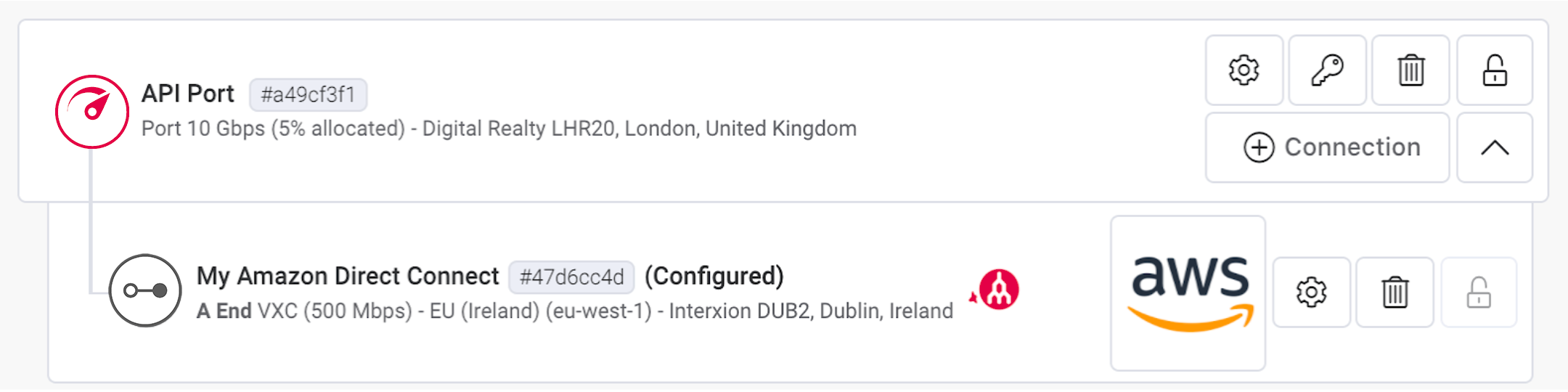
在此範例中,AWS Hosted VIF 會出現在 AWS 入口網站帳戶的 Direct Connect - Virtual Interfaces 底下。帳戶擁有者可以接受該 Virtual Interface,並將其連線到 Virtual Private Gateway 或 Direct Connect Gateway,然後再連到其 VPC。