使用 API 建立 MCR
本主題說明建立 MCR 的 API 程序,包括如何查詢 MCR 的地點,以及如何驗證並完成訂單。
開始之前,請先取得有效的存取權杖。 如需詳細資訊,請參閱 建立 API 金鑰。
在 Postman 集合中查詢 MCR 的地點詳細資訊
-
在左側導覽列展開 Locations(位置) 資料夾,然後按一下 GET Locations (v3)(取得地點 (v3))。
此請求不需要提供 Parameters 或 Body 資訊。 -
按一下 Send(送出) 以發出 GET 請求。
GET {baseUrl}/v3/locations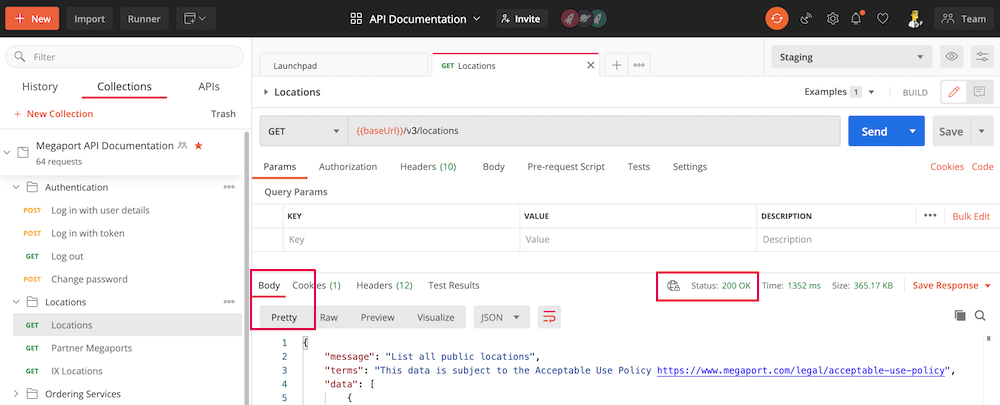
請確認請求已成功,查看是否為 Status: 200 OK,並在 Body 區段以 Pretty 格式顯示回應。
此請求會傳回數百個 Megaport 地點。
-
按一下放大鏡,搜尋回應中位於美國市場,且在
diversityZones物件中包含mcrSpeedMbps的站點。要在某個地點佈建 MCR,
diversityZones物件中必須提供連接埠速率。請確認該地點具備 MCR 可用的速率與 Diversity 區域。
{
            "id": 60,
            "name": "CoreSite LA1",
            "address": {
                "street": "624 South Grand Avenue",
                "suburb": null,
                "city": "Los Angeles",
                "state": "CA",
                "postcode": "90017",
                "country": "USA"
            },
            "dataCentre": {
                "id": 18,
                "name": "CoreSite"
            },
            "metro": "Los Angeles",
            "market": "US",
            "status": "Active",
            "longitude": -118.25554,
            "latitude": 34.04791,
            "orderingMessage": null,
            "diversityZones": {
                "red": {
                    "mcrSpeedMbps": [
                        2500,
                        5000,
                        10000,
                        1000
                    ],
                    "megaportSpeedMbps": [
                        1000,
                        10000,
                        100000
                    ],
                    "mveMaxCpuCoreCount": null,
                    "mveAvailable": true
                },
                "blue": {
                    "mcrSpeedMbps": [
                        5000,
                        1000,
                        2500,
                        10000
                    ],
                    "megaportSpeedMbps": [
                        1000,
                        100000,
                        10000
                    ],
                    "mveMaxCpuCoreCount": null,
                    "mveAvailable": true
                }
            },
            "productAddOns": {
                "crossConnect": {
                    "available": true,
                    "type": "STANDARD"
                }
            }
        }
要建立一個 MCR,您需要 id 值。本範例中,位置 ID 為 60。
測試與驗證 MCR 訂單
-
在 Postman 的左側導航中展開 Megaport Cloud Router (MCR),並選擇 Validate MCR Order (v3)。
-
以
locationId(60)、productName(您想要的 MCR 名稱)、term(承諾期間的最短月份數:1、12、24、36、48 或 60)、及portSpeed(1000、2500、5000 或 10000 Mbps)更新 Body,然後按一下 Send。
如果您不想使用 Megaport 預設 ASN 133937,則僅需填寫 ASN 值。
請加入分散區域。檢查 location 結果,以查看在diversityZones下,您的 MCR 位置有哪些可用的分散區域。
如果未明確選擇分散區域,將於建立 MCR 時自動分配一個分散區域。POST {baseUrl}/v3/networkdesign/validate
[
    {
        "locationId":60,
        "term": 12,
        "promoCode": "promox3mnthfree2",
        "productName":"Test MCR",
        "productType":"MCR2",
        "portSpeed":2500,
        "config": {
          "mcrAsn": 133937,
          "diversityZone":"blue"
        }
    }
]
成功的回應會通過驗證,並顯示 200 OK 狀態。回應中也包含服務的定價細節。
{
    "message": "Validation passed",
    "terms": "This data is subject to the Acceptable Use Policy https://www.megaport.com/legal/acceptable-use-policy",
    "data": [
        {
            "price": {
                "hourlySetup": 0,
                "dailySetup": 0,
                "monthlySetup": 0,
                "hourlyRate": 0,
                "dailyRate": 0,
                "monthlyRate": 1440.00,
                "fixedRecurringCharge": 0,
                "postPaidBaseRate": "no base rate",
                "longHaulMbpsRate": 0,
                "mbpsRate": 6.000000000000000,
                "currency": "USD",
                "key": "no key",
                "productType": "MCR2",
                "empty": false
            },
            "serviceName": "API Test MCR",
            "productType": "MCR2",
            "productUid": "78aebd6b-7601-4331-82bc-dcd07f9f21a6",
            "string": "Los Angeles"
        }
    ]
}
訂購已驗證的 MCR
-
當 MCR 請求已驗證並檢視完成本資訊後,從 POST Validate MCR Order (v3) 複製 Body,並貼上至 POST Buy MCR (v3) 的 Body。
重要
如果您在 api.megaport.com 上執行此呼叫,您的帳戶將會被收取服務費用。或者,您可以如這些範例一樣,於 staging(測試)環境使用 API,則不會產生費用。
-
送出請求。
此輸出顯示一個成功的回應。
{
    "message": "MCR2 [426fa830-4b66-41ad-95a1-197d55e074b1] created.",
    "terms": "This data is subject to the Acceptable Use Policy https://www.megaport.com/legal/acceptable-use-policy",
    "data": [
        {
            "serviceName": "Test MCR",
            "name": "Test MCR",
            "secondaryName": null,
            "technicalServiceId": 187964,
            "technicalServiceUid": "426fa830-4b66-41ad-95a1-197d55e074b1",
            "requestedDate": 1707800936928,
            "configuredDate": null,
            "currentEstimatedDelivery": null,
            "companyName": "Megaport Lab",
            "companyId": 1153,
            "billingContactName": null,
            "billingContactId": null,
            "adminContactName": null,
            "adminContactId": null,
            "technicalContactName": null,
            "technicalContactId": null,
            "salesName": null,
            "salesId": null,
            "billableId": 179527,
            "billableUsageAlgorithm": null,
            "productType": "MCR2",
            "provisioningStatus": "DEPLOYABLE",
            "failedReason": null,
            "inAdvanceBillingStatus": null,
            "provisioningItems": [],
            "tags": [],
            "vxcDistanceBand": null,
            "intercapPath": null,
            "marketplaceVisibility": false,
            "vxcPermitted": true,
            "vxcAutoApproval": false,
            "createDate": 1707800936928,
            "terminationDate": null,
            "contractStartDate": null,
            "contractTermMonths": 12,
            "rateType": "MONTHLY",
            "trialAgreement": false,
            "payerCompanyId": null,
            "nonPayerCompanyId": null,
            "minimumSpeed": null,
            "maximumSpeed": null,
            "rateLimit": 2500,
            "errorMessage": null,
            "lagId": null,
            "aggregationId": null,
            "lagPrimary": null,
            "market": "USA",
            "accountManager": null,
            "promptUid": null,
            "components": [],
            "attributes": [],
            "aLocation": "lax-cs1",
            "bLocation": null,
            "aMetro": "Los Angeles",
            "aCountry": "USA",
            "aLocationId": 60,
            "bLocationId": null,
            "bMetro": null,
            "bCountry": null,
            "attributeTags": {},
            "createdBy": "f39b8983-256e-4643-adec-9f0b5da09ab7",
            "buyoutPort": false,
            "virtual": true,
            "locked": false,
            "adminLocked": false,
            "bgpShutdownDefault": false,
            "originDomain": null
        }
    ]
}
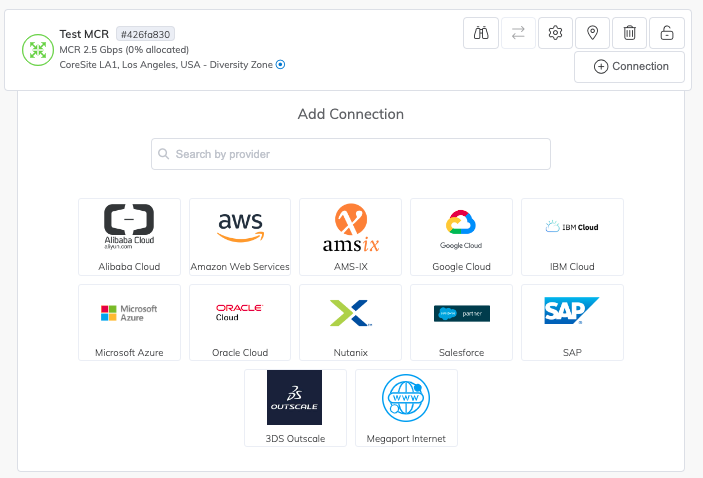
新的 MCR 現在會出現在你的工作環境中,位於 portal.megaport.com 或 portal-staging.megaport.com。
提示
若要查看此範例所用請求的所有選項,請參閱 https://dev.megaport.com。
下一步是為此 MCR 建立 VXC。
如需詳細資訊,請參閱: